Compare Text
Compare two texts by pasting or uploading them to see differences, including added, removed, moved, and modified text.
Your comparison results will show here after you click Compare.
Compare Text Online
Spotting what changed between two versions of a document usually means reading every line twice. CompareText.pro skips that step — paste or upload your original text into one panel, your updated version into the other, and it shows you exactly what's different.
See every change instantly
The comparison engine breaks edits down into four types, so you know not just that something changed, but what kind of change it was:
- Added text, highlighted in green
- Removed text, highlighted in red
- Moved lines, highlighted in blue
- Modified words, marked directly within the line
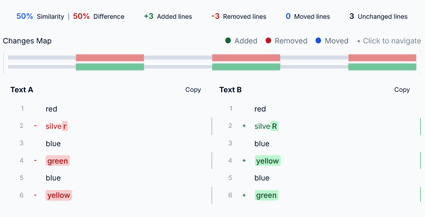 Added, removed, and modified text highlighted inline
Split view
Both documents sit next to each other with lines kept in sync, so you never lose your place while scrolling through long files. It's a good fit for:
- Reviewing document revisions
- Comparing contracts
- Editing articles
- Reviewing source code
- Comparing AI-generated texts
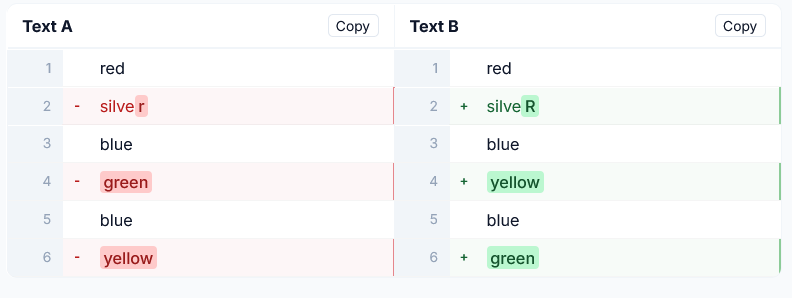 Two documents, aligned line by line
Unified view
Prefer reading changes as one continuous document instead? Switch to Unified View to see additions and removals together in a single stream — handy for smaller edits or when you're preparing something for review.
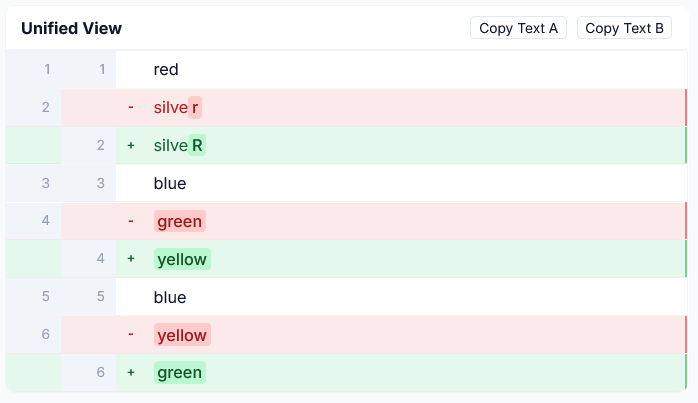 Additions and removals shown in one continuous timeline
Live comparison
Turn it on and results update as you type — no compare button to press after every edit.
Search within results
Jump straight to a specific word or phrase instead of scanning a long comparison line by line.
Word wrap
Long lines wrap automatically so nothing runs off the edge of the screen on smaller displays. Toggle it off anytime if you'd rather scroll horizontally.
Hide unchanged lines
In a large file, the parts that didn't change just take up space. Turn this on to see only the edits.
Ignore whitespace
Filters out differences that are just extra spaces, tabs, or formatting — useful for source code, Markdown, JSON, and config files.
Ignore letter case
Treats Hello, HELLO, and hello as the same word — useful when comparing imported or standardized content.
Changes summary & visual map
Before you dig into individual edits, a quick summary tells you how different the two versions really are: similarity percentage, difference percentage, and counts of added, removed, moved, and unchanged lines.
The Changes Map gives you a bird's-eye view of the whole document, with colored markers for additions, removals, and edits — so you can jump straight to a section instead of scrolling through a long file looking for it.
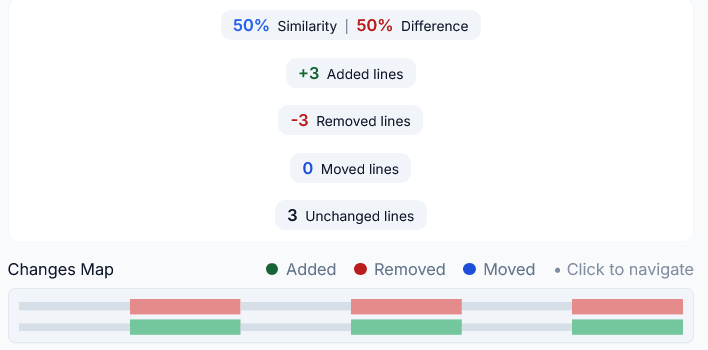 Similarity score plus added, removed, moved, and unchanged line counts
Works well with
Each panel has its own Copy button, so you can grab the original or the modified text on its own without selecting it by hand. It's especially useful with:
Who it's for
Writers & editors
Track revisions across drafts without re-reading the whole piece.
Developers
Review code changes and diffs without leaving the browser.
Legal & contracts
Catch every clause that moved, changed, or disappeared between drafts.
Students & researchers
Compare sources, citations, or paper revisions side by side.
Content & SEO teams
Check what actually changed before publishing an update.
Anyone checking AI output
Compare AI-generated drafts against each other or against the original.
Why people use CompareText.pro
There's no shortage of text-comparison tools online, but most are either stuck in 2010 or buried under features nobody asked for. CompareText.pro sticks to what actually matters: fast comparisons, a clean side-by-side layout, live updates as you type, and highlighting you can trust. Everything runs in your browser, so your text never leaves your device.